

Posted on 06/04/2026 by Harikanth Reddy
Best Practices for Structuring URLs for SEO
Read Time: 12 minutes
An SEO-friendly URL is short (under 75 characters), uses lowercase letters and hyphens, includes one relevant keyword in the slug, follows a logical site hierarchy of 3 – 4 levels, and runs on HTTPS. URLs structured this way earn 45% more clicks than those without a matching keyword, according to Backlinko’s analysis of 4 million Google search results.
URL structure affects how Google crawls and indexes your pages, how users decide whether to click, and whether AI answer engines like Google AI Overviews or ChatGPT cite your content.
What Is URL Structure?
A URL (Uniform Resource Locator) is the web address that directs browsers and search engines to a specific page. Every URL follows a standard format with distinct components that each serve a purpose.
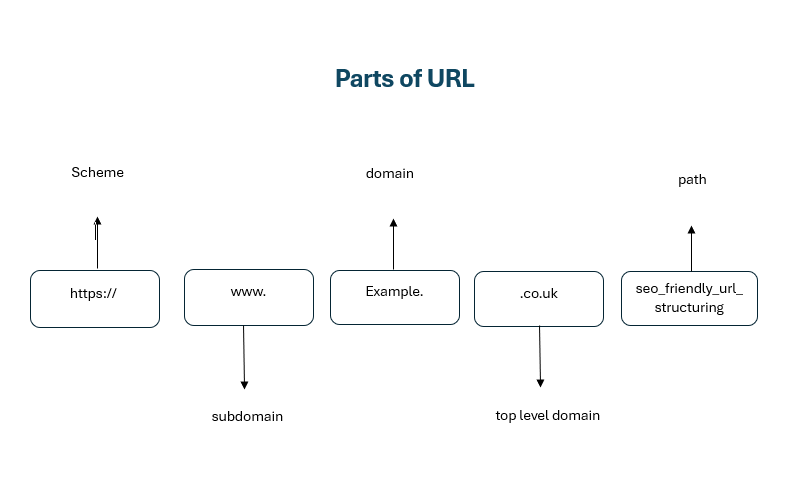
- Scheme (https://): Defines how the browser connects. HTTPS is secure and a confirmed Google ranking factor.
- Subdomain (www.): Optional prefix. Use one version consistently and redirect the other to avoid duplication.
- Domain (example): Your website name and core brand identifier.
- TLD (.co.uk): Indicates region or type. .co.uk suits UK audiences; .com is more global.
- Path (/seo-friendly-url-structuring): The specific page. Keep it short, descriptive, and use hyphens.
Why Does URL Structure Matter for SEO?
URL structure directly impacts how search engines crawl, understand, and rank your pages. It also influences click-through rate, user trust, and whether AI search engines select your content as a cited source. Here’s why the URL structure matters:
| Factors | Why It Matters |
| Crawlability | Clean, logical URLs help Googlebot navigate your site efficiently. According to Google’s URL structure documentation, overly complex URLs with multiple parameters can prevent complete indexing. |
| Click-through rate | URLs containing a keyword earn a 45% higher CTR than those without. Users are more likely to click a URL that clearly matches their query. |
| User experience | A readable URL tells visitors what to expect before they click. This builds trust and reduces bounce rates. |
| AI search visibility | Generative search engines (Google AI Overviews, Perplexity, ChatGPT) extract and cite content from pages with clear, well-structured URLs. A descriptive URL path signals topical relevance to both traditional and AI ranking systems. |
| Link sharing | Short, readable URLs are easier to share on social media, in emails, and in print. They also look cleaner as anchor text in backlinks. |
| PageRank flow | A logical URL hierarchy distributes link equity from your root domain through categories to individual pages, strengthening your entire site architecture. |
15 Best Practices for SEO-Friendly URLs
Here are 15 tested best practices for structuring URLs and how to create SEO-friendly URLs that rank higher, earn more clicks, and perform in both traditional and AI-powered search.

1. Keep URLs Short and Descriptive
Use 3 – 5 words in your URL slug that accurately describe the page content. Short URLs are easier for users to read, share, and remember. Focus on the primary keyword and the page’s core topic.
| Before | example.com/blog/2024/03/14/understanding-the-best-practices-for-url-structuring-tips |
| After | example.com/blog/url-structure-best-practices |
2. Include Your Primary Keyword
Place your target keyword naturally in the URL slug. This signals topical relevance to search engines and helps users confirm the page matches their query.
| Good | loop-digital.co.uk/digital-marketing-services/seo-services |
| Avoid | loop-digital.co.uk/services/offering-id-4782 |
3. Use Hyphens to Separate Words
A hyphen (-) is the only recommended word separator in URLs. Google treats hyphens as spaces between words, making each word individually readable. Underscores (_) are treated as word joiners, meaning seo_tips reads as one word to Google, not two.
| Correct | example.com/seo-friendly-urls |
| Incorrect | example.com/seo_friendly_urls |
4. Build a Logical URL Hierarchy
Structure your URLs to reflect your site’s content hierarchy, keeping depth to 3 – 4 levels maximum. A clear hierarchy helps both users and search engines understand how pages relate to each other and where they sit within your site architecture.
| Before | example.com/services/seo/technical-seo |
| After | example.com/services/digital/marketing/seo/technical/audits/on-page |
5. Prefer Subfolders Over Subdomains
Subfolders (/blog/) consolidate your site’s authority under one domain, while subdomains (blog.example.com) are treated by Google as separate entities. Unless you have a specific technical requirement, such as hosting a web application on a different stack, subfolders are the stronger choice for SEO.
| Stronger | example.com/blog/seo-tips |
| Weaker | blog.example.com/seo-tips |
6. Remove Unnecessary Stop Words
Strip words like “and”, “the”, “of”, and “in” from your URLs unless they are essential for readability. Stop words add length without adding search value.
| Before | example.com/the-best-tips-for-seo-in-2026 |
| After | example.com/seo-tips-2026 |
If removing a stop word makes the URL confusing or changes the meaning, keep it. Readability always takes priority over character count.
7. Avoid Dates and Numbers in URLs
Dates in URLs make content appear outdated and force URL changes when you refresh the article. If your blog platform auto-inserts dates (e.g., /2024/03/14/post-title), change the permalink structure to remove them.
| Avoid | example.com/blog/2024/03/seo-url-tips |
| Better | example.com/blog/seo-url-tips |
8. Always Use HTTPS
HTTPS is a confirmed Google ranking signal and a baseline requirement for any website in 2026. Secure URLs protect user data, display the padlock icon in browsers, and build trust. Sites without HTTPS are flagged as “Not Secure” by Chrome, which damages both CTR and conversions.
If your site still runs on HTTP, an SSL certificate is the single highest-impact technical SEO fix you can make. Our web development team handles HTTPS migrations as part of every new build.
9. Choose the Right TLD and ccTLD
A top-level domain (TLD) is the suffix at the end of your domain, such as .com, .co.uk, .org, .net. For UK-based businesses targeting a UK audience, a .co.uk ccTLD signals geographic relevance to Google. For international audiences, .com remains the strongest generic option.
If your business operates in multiple countries, consider using subdirectories for each market (e.g., example.com/uk/, example.com/de/) rather than separate ccTLD domains. This consolidates domain authority under one root.
10. Implement Canonical Tags for Duplicate Content
A canonical tag (rel=”canonical”) tells search engines which version of a page is the authoritative one when duplicate or near-duplicate URLs exist. This is critical for e-commerce sites where product variants, filtered views, and pagination create multiple URLs pointing to similar content.
Example: If example.com/shoes?colour=red and example.com/shoes?colour=blue display similar content, both should include a canonical tag pointing to example.com/shoes.
11. Use 301 Redirects When Changing URLs
A 301 redirect is a permanent redirect that passes approximately 90 – 99% of link equity from the old URL to the new one. Whenever you change a URL, during a rebrand, site migration, or content restructure, a 301 redirect ensures users and search engines reach the correct page without encountering a 404 error.
Changing URLs without redirects breaks existing backlinks, loses accumulated ranking authority, and creates a poor user experience.
Planning a site migration or URL restructure?
Our team can audit your current URLs, build a redirect map, and manage the transition.
12. Avoid Dynamic URLs Where Possible
Dynamic URLs contain parameters like ?id=123&session=abc that are generated by databases or CMS platforms. These URLs are difficult to read, hard to share, and can create crawl bloat, where Googlebot wastes crawl budget on thousands of parameter variations that point to similar content.
| Dynamic | example.com/products?cat=shoes&colour=red&size=10 |
| Static | example.com/shoes/red-running-shoes |
13. Be Consistent with Trailing Slashes
A trailing slash is the / at the end of a URL (e.g., /page/ vs /page). Google treats these as different URLs. Pick one format and apply it consistently across your entire site, then redirect the non-preferred version to the preferred one.
Inconsistency creates duplicate content issues and splits ranking signals between two versions of the same page. This is one of the most common technical SEO problems we encounter and one of the easiest to fix.
14. How to Handle International URLs
For multilingual or multi-regional websites, use subdirectories (example.com/fr/, example.com/de/) with hreflang tags. This consolidates domain authority under one root domain, unlike separate ccTLDs, which split authority.
Structure examples:
example.com/en-gb/services/seo – English, UK
example.com/de/services/seo – German
Hreflang implementation can be complex.
If your business serves international markets, this is an area where specialist SEO support pays for itself quickly.
15. Optimise URLs for AI Search and Generative Engines
AI-powered search engines (Google AI Overviews, ChatGPT, Perplexity) use URL paths as relevance signals when deciding which content to cite in generated answers. A descriptive, keyword-rich URL path reinforces the topical signal of your content, making it more likely to be selected as a source.
Additionally, pages with clear URL hierarchies and well-structured content are more frequently cited in AI Overviews.
This is an emerging area of search optimisation. For the latest guidance on AI visibility, see our content marketing services.
Quick Comparison of Good vs Bad URLs
Here’s a side-by-side comparison of common URL mistakes and their corrected versions
| Issue | Bad URL | Good URL |
| Keyword stuffing | /seo/seo-services/seo-audit-seo | /services/seo-audit |
| Dynamic parameters | /products?cat=4&id=872&s=1 | /shoes/red-running-shoes |
| Dates in slug | /blog/2024/03/14/url-tips | /blog/url-structure-tips |
| Underscores | /seo_friendly_urls | /seo-friendly-urls |
| Uppercase mix | /Blog/SEO-Tips | /blog/seo-tips |
| Too deep | /a/b/c/d/e/f/page | /services/seo/technical-seo |
| Stop word bloat | /the-best-tips-for-seo-in-2026 | /seo-tips-2026 |
| No keyword | /page-1234 | /conversion-rate-optimisation |
Common URL Mistakes to Avoid
The most frequent URL mistakes are: changing URLs without 301 redirects, keyword stuffing in slugs, using session IDs as permanent URLs, inconsistent trailing slashes, and leaving auto-generated dates in blog paths.
These are the URL problems we find most often during client audits:
- Changing URLs without 301 redirects. This is the number one cause of traffic loss during site redesigns. Every old URL must redirect to its new equivalent.
- Keyword stuffing in slugs. Repeating the same keyword in every subdirectory (/seo/seo-services/seo-audit/) looks spammy to Google and users. Use each keyword once.
- Using session IDs in URLs. Session-based parameters create thousands of duplicate URLs that waste crawl budget and confuse indexing.
- Inconsistent trailing slashes. Mixing /page and /page/ across your site creates duplicate content. Pick one format and redirect the other.
- Dates in blog URLs. Auto-generated date paths (/2023/04/) make evergreen content appear outdated. Remove them and use post-name permalinks.
- UTM parameters in internal links. UTM tracking codes (?utm_source=email) create indexable duplicates if not handled with canonical tags. Never use UTM parameters in internal links, only in external campaign URLs.
- Mixed-case URLs. Uppercase letters create duplicates on case-sensitive servers. Enforce lowercase site-wide with server-level redirects.
URL Structure Checklist
Use this quick-reference checklist when creating or auditing any URL on your website.
- URL is under 75 characters
- Uses lowercase letters only
- Words separated by hyphens (not underscores)
- Contains the primary target keyword
- No unnecessary stop words
- No dates or ID numbers in the slug
- HTTPS protocol is active
- Logical hierarchy (3 – 4 levels max)
- Trailing slash format is consistent site-wide
- Canonical tag is set correctly
- No duplicate parameter variations indexed
- 301 redirects are in place for any changed URLs
- URL topic matches the page’s H1
- No session IDs or UTM parameters in permanent URLs
- International pages use hreflang + subdirectory structure
- URL is human-readable and shareable
Key Takeaways – What Makes a URL SEO-Friendly
- Keep it short: 3 – 5 words, under 75 characters
- Include one primary keyword in the slug
- Use hyphens, not underscores
- Lowercase only to enforce server rules
- Logical hierarchy: 3 – 4 levels maximum
- HTTPS is non-negotiable
- 301 redirect every changed URL
- Canonical tags for duplicate/variant pages
- Consistent trailing slash format
- Descriptive URLs improve AI search citations
How Loop Digital Can Help
URL structure is one piece of a larger technical SEO puzzle. Getting it right requires a clear site architecture plan, properly implemented redirects, ongoing monitoring, and coordination with your web development team.
At Loop Digital, we help UK businesses get this right. Our SEO and web development teams work together to:
- Audit your existing URL structure and identify issues that are costing you rankings and traffic.
- Plan and execute site migrations with full redirect mapping, so you don’t lose the authority you’ve built.
- Build new websites with SEO-friendly URL structures from day one, saving you the cost and complexity of fixing them later.
- Monitor and optimise your technical SEO on an ongoing basis through our managed SEO services.
URLs are messy; you’re leaving rankings on the table. At Loop Digital, we’ll review your URL structure for free and show you exactly what to fix.
Book a free consultation, and find out how your URLs are performing.
Frequently Asked Questions
- Do URLs affect SEO rankings?
Yes. URLs are a minor but confirmed ranking factor. More importantly, they influence click-through rate, crawlability, and how AI search engines assess topical relevance. A well-structured URL supports rankings indirectly through better user signals and more efficient indexing.
- How long should a URL be?
Keep URLs under 75 characters where possible. Shorter URLs are easier to read, less likely to be truncated in search results, and tend to correlate with higher rankings. The slug itself should ideally contain 3 – 5 descriptive words.
- What happens if I change my URLs?
If you change a URL without setting up a 301 redirect, you lose the ranking authority accumulated on the old URL. Search engines treat the new URL as a brand-new page with no history. Always implement 301 redirects from old URLs to new ones, update your internal links, and resubmit your sitemap in Google Search Console.
- How do URLs affect AI search results?
AI answer engines like Google AI Overviews, ChatGPT, and Perplexity use URL paths as relevance signals when selecting sources to cite. Descriptive, keyword-relevant URLs reinforce the topical authority of your content, making it more likely to appear in AI-generated answers. Clear URL hierarchies also help these systems understand the structure and scope of your content.
- Should I use subfolders or subdomains?
Subfolders (example.com/blog/) are generally better for SEO because they consolidate all authority under one domain. Subdomains (blog.example.com) are treated as separate sites by Google, which means they don’t benefit from the root domain’s authority. Use subdomains only when you have a technical reason to do so.
- How do I fix the URL structure on an existing website?
Audit your current URLs using Google Search Console and a crawling tool like Screaming Frog. Identify pages with non-descriptive slugs, missing keywords, duplicate parameter variations, or broken redirects. Create a redirect map before making any changes. If the scope is significant, this is a task where professional SEO support reduces risk considerably.
Looking for your next opportunity?
Digital marketing careers
We’re always on the lookout for talented individuals to join our ever growing team. If you think you’d be a great match for Loop Digital, we’d love to hear from you.








Join 300+ business owners getting weekly growth strategies - subscribe now.
"*" indicates required fields